
If you are unable to log in to mail.thexyz.com, your IP address may have been temporarily blocked. This usually happens after too many failed login attempts.
The good news is you can remove the block yourself in just a few minutes.
Step 1: Check Your IP Status
- Go to: https://bl.thexyz.com
- Your IP address will usually be pre-filled
- Click "Scan IP"
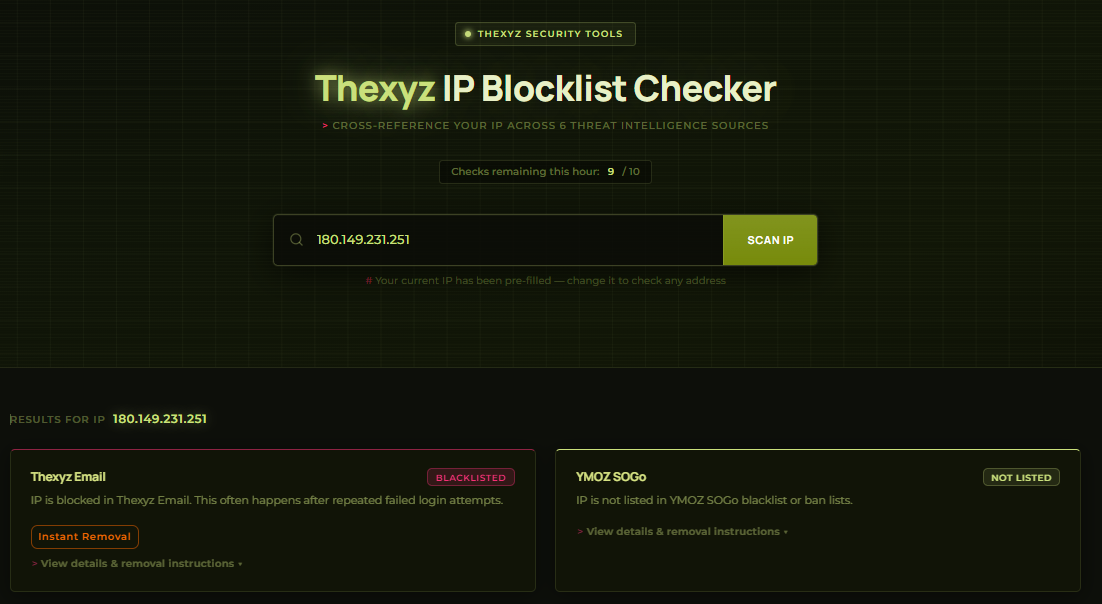
If your IP shows as Blacklisted, continue to the next step.
Step 2: Click Instant Removal
- Locate the "Instant Removal" button
- Click it to begin the unblock process
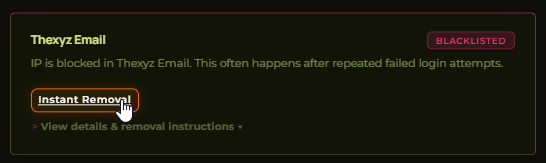
This block typically occurs after repeated failed login attempts and is not a security issue.
Step 3: Request a Verification Code
Fill out the form with the following details:
- IP Address: This will be filled in automatically
- Authorized Email Address: Your email address (e.g. user@yourdomain.com)
- Domain: Your domain name (e.g. yourdomain.com)
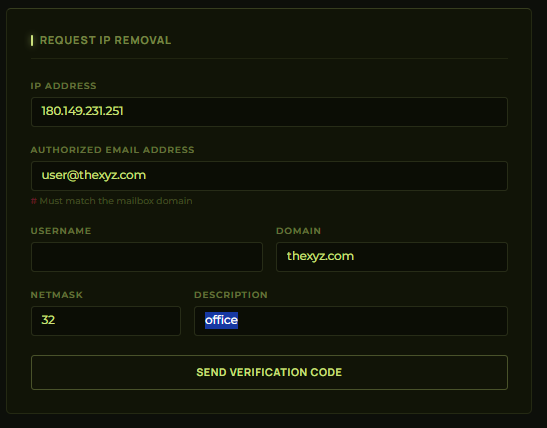
Click "Send Verification Code" to continue.
Step 4: Enter Your Verification Code
- Check your email inbox
- Find the message containing your 6-digit verification code
- Enter the code on the screen
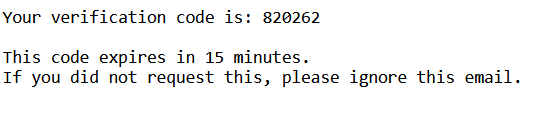
Note: The verification code expires after 15 minutes.
Step 5: Access Restored
Once verified:
- Your IP address will be removed from the blocklist
- You can log in again at mail.thexyz.com
Tips to Avoid Being Blocked Again
- Double-check your password before logging in
- Avoid repeated failed login attempts
- Update saved passwords on your devices
- Use a one-time password.
- If unsure, reset your password before trying again
Need Help?
If you are still unable to access your email, please contact our support team:
