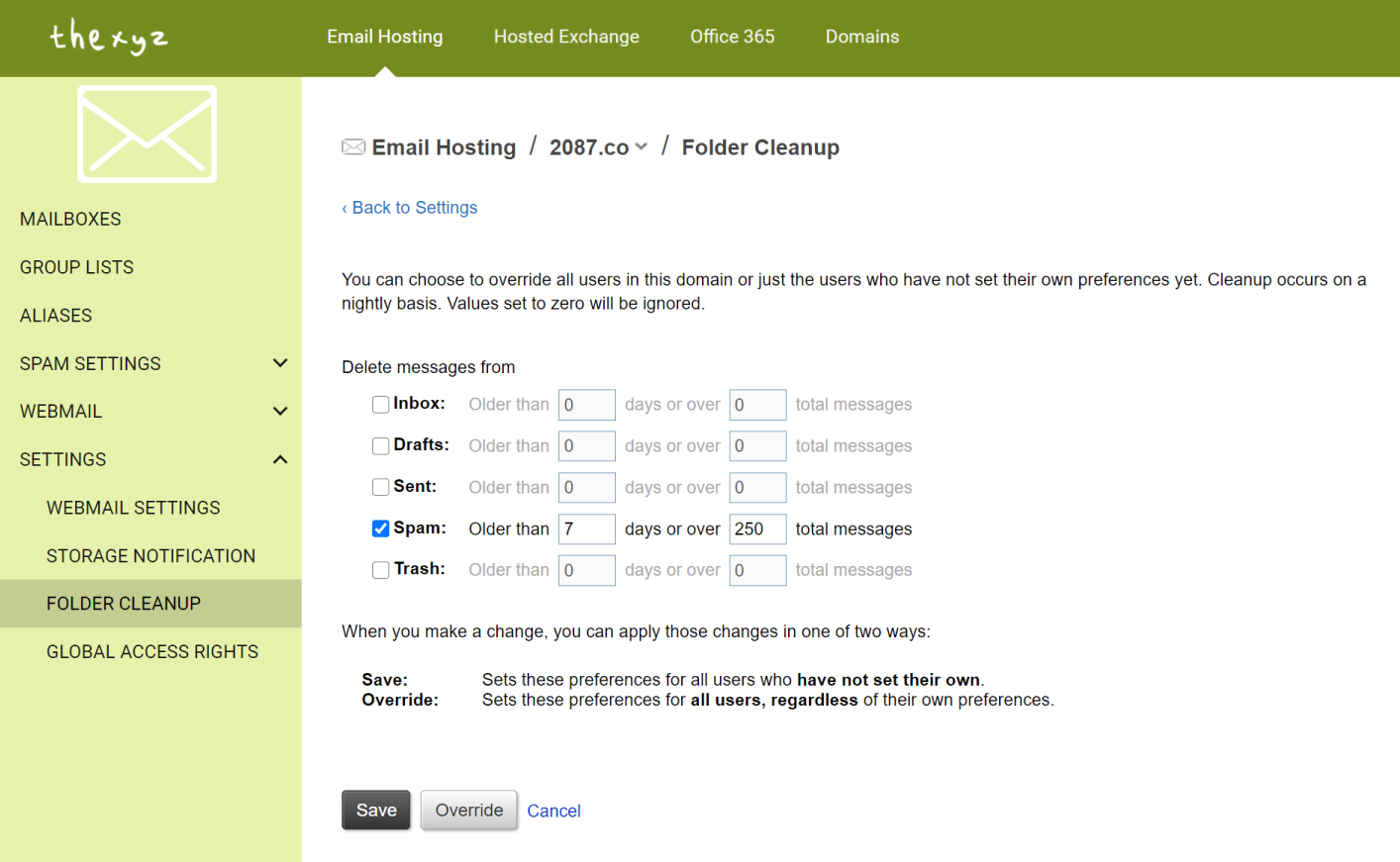
Email folders can fill up quickly and to ensure optimal performance of your mailbox, it is important to follow best practices for email storage. Email administrators can modify the settings and apply automatic cleanup rules on default email folders.
These changes can be adjusted either per mailbox or for each user on a domain. To apply these rules, you will need to log in to the Email Admin Portal.
Then nativage to: Email Hosting >> Settings >> Folder Cleanup
You can specify automatic cleanup rules for the following email folders:
- Inbox
- Drafts
- Sent
- Spam
- Trash
You can choose to override all users in this domain or just the users who have not set their own preferences yet. The mailbox cleanup occurs on a nightly basis. Values set to zero will be ignored. When you adjust the mailbox cleanup options, you can apply those changes in one of two ways:
Save: Sets these preferences for all users on the email domain who have not set their own.
Override: Sets these preferences for all users on the email domain, regardless of their own preferences