Showing the BCC field in Webmail

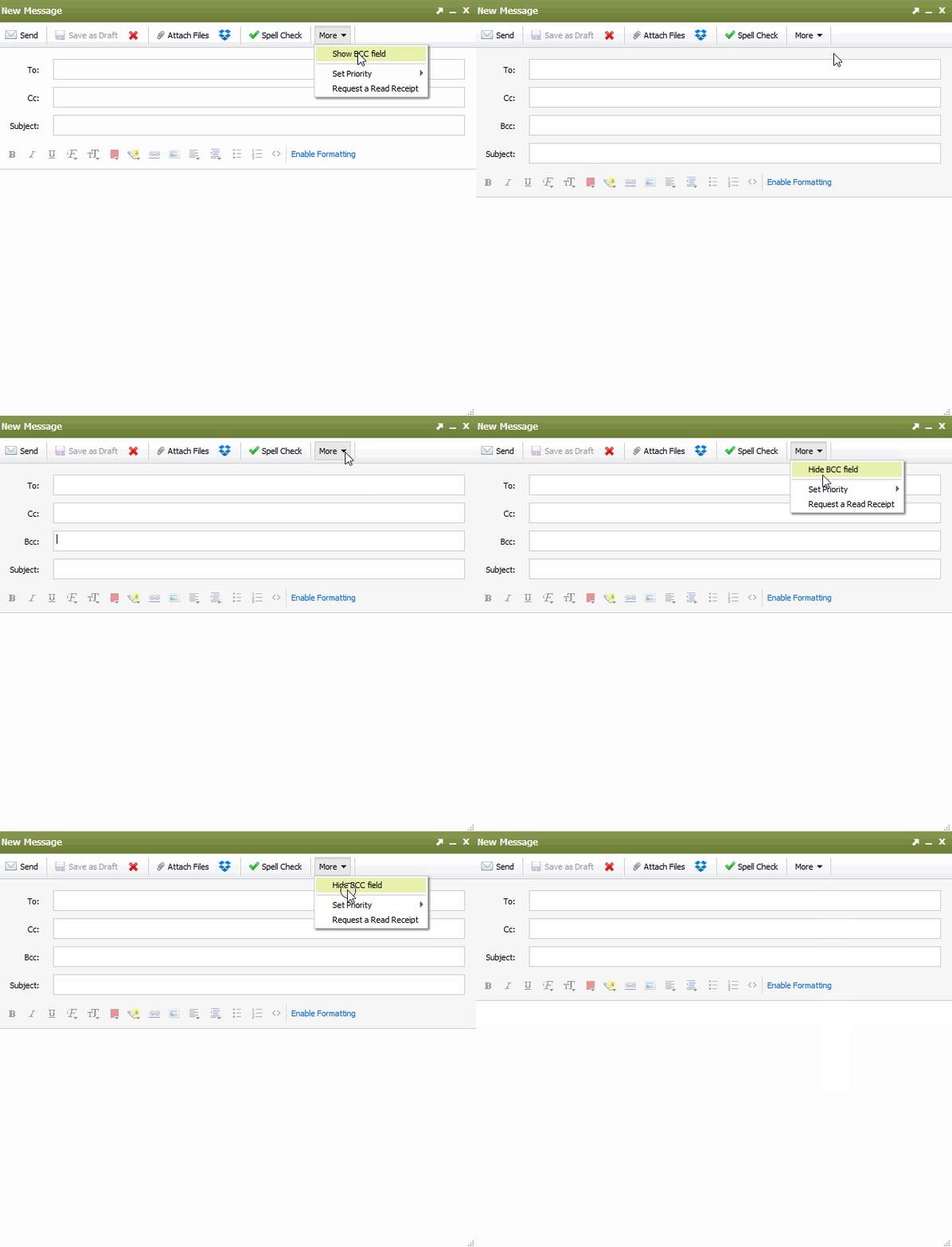
If when composing an email in Webmail, you wish to show the BCC field. select the More tab in the Compose Window and select Show BCC field.

The Webmail compose window will now show the BCC field as pictured below. When you toggle the menu to show the BCC field, you can enter an email address that will be 'blind carbon copied."

  • 112 Els usuaris han Trobat Això Útil
Ha estat útil la resposta?

Articles Relacionats

I'm having issues composing messages in Webmail

If you're having issues composing mail in Webmail, there are a few things you can try: Make...

I am unable to log in to Webmail

If you are still unable to access Webmail, try the following troubleshooting steps: Verify the...

Webmail keyboard shortcuts

When you login to Webmail, your premium webmail account includes various keyboard shortcuts....

Setup SMS password reset for Webmail

Email password resets for Webmail require SMS verification or Multi-Factor Authentication. If you...

Searching for an Email

When you are in an email folder (Inbox, Drafts, Sent, etc.), the Search box will appear above the...