Showing the BCC field in Webmail

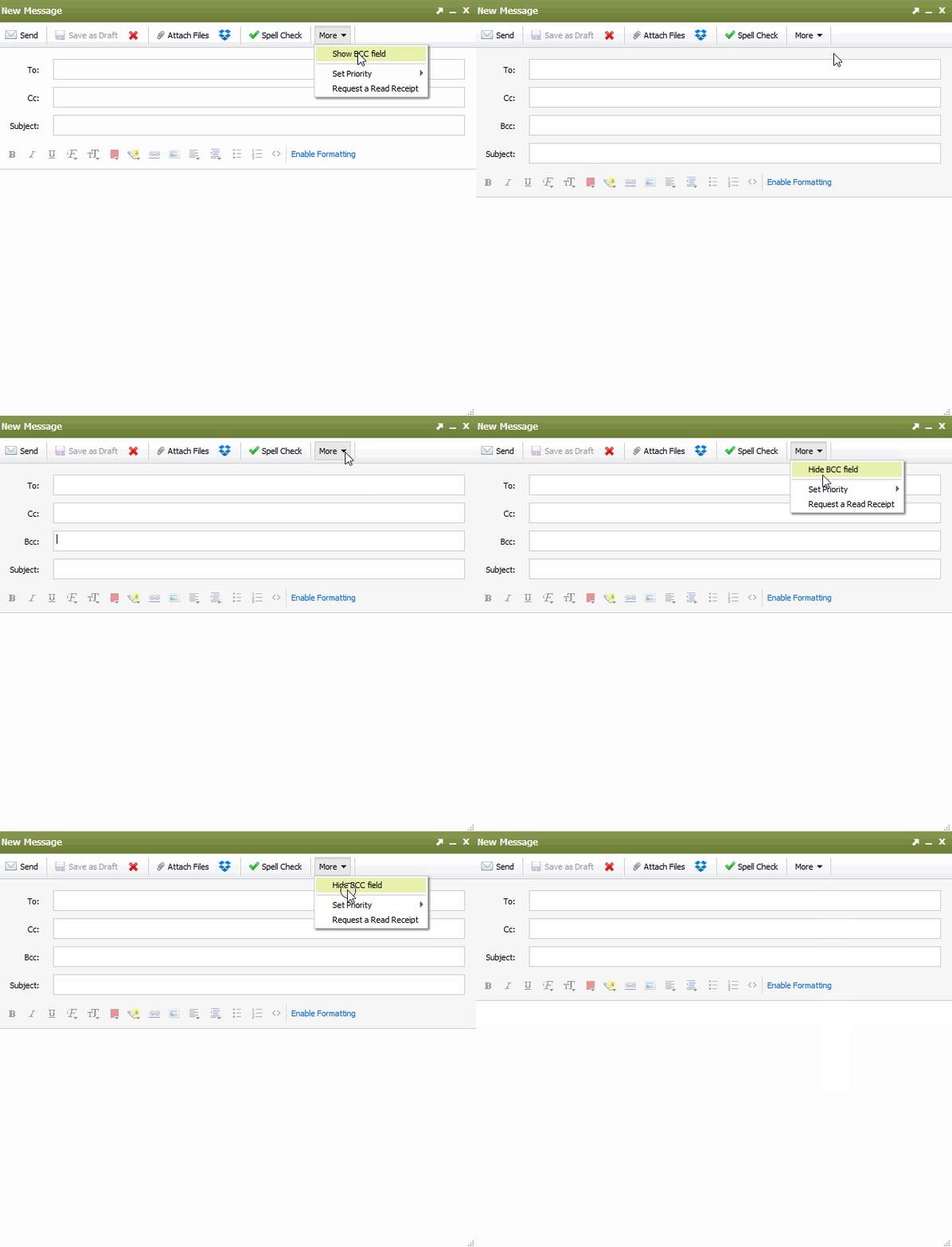
If when composing an email in Webmail, you wish to show the BCC field. select the More tab in the Compose Window and select Show BCC field.

The Webmail compose window will now show the BCC field as pictured below. When you toggle the menu to show the BCC field, you can enter an email address that will be 'blind carbon copied."

  • 112 משתמשים שמצאו מאמר זה מועיל
?האם התשובה שקיבלתם הייתה מועילה

מאמרים קשורים

I am unable to log in to Webmail

If you are still unable to access Webmail, try the following troubleshooting steps: Verify the...

Webmail keyboard shortcuts

When you login to Webmail, your premium webmail account includes various keyboard shortcuts....

Moving an Email into a Folder

To move an email into another folder, click and drag the email from the email list to a folder in...

How can I access Webmail settings?

You can access Webmail settings of your Premium Email account by logging into Webmail:...

Renaming a Folder

To rename a folder with Webmail, follow the directions below:1. Right-click on the email folder...