Flagging an Email

Within Webmail you can use colored flags to mark an email that needs your attention. This also helps organize certain emails and makes them easier to find later.
    

  • To flag an email, click once on the flag icon.
  • To flag several emails, click the checkbox next to each email you want to flag, and then select Add Flag from the Select Action drop-down menu.
  • To change the flag color, right-click the flag icon and select a color.
  • To remove the flag, click the flag icon again.


The email flag menu can also be found under the More menu.
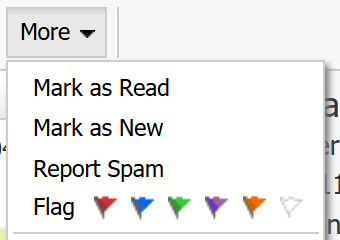

Flagging an Email

  • 126 Kunder som kunne bruge dette svar
Hjalp dette svar dig?

Relaterede artikler

I'm having issues composing messages in Webmail

If you're having issues composing mail in Webmail, there are a few things you can try: Make...

I am unable to log in to Webmail

If you are still unable to access Webmail, try the following troubleshooting steps: Verify the...

Webmail keyboard shortcuts

When you login to Webmail, your premium webmail account includes various keyboard shortcuts....

Setup SMS password reset for Webmail

Email password resets for Webmail require SMS verification or Multi-Factor Authentication. If you...

Searching for an Email

When you are in an email folder (Inbox, Drafts, Sent, etc.), the Search box will appear above the...