How to mute notification sounds in Webmail

Follow these steps to turn off notification sounds in Webmail.

  1. Log in to Webmail
    Visit mail.thexyz.com .

  2. Open My Account
    In the top-right corner, click the round profile icon, then select My account.
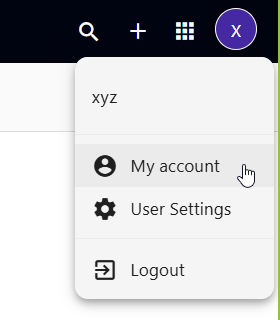
    Webmail settings menu showing My account option

  3. Click Look & Feel
    In the left-hand menu, select Look & Feel.

  4. Turn Off Sounds
    In the Sounds section, check Mute all sounds.
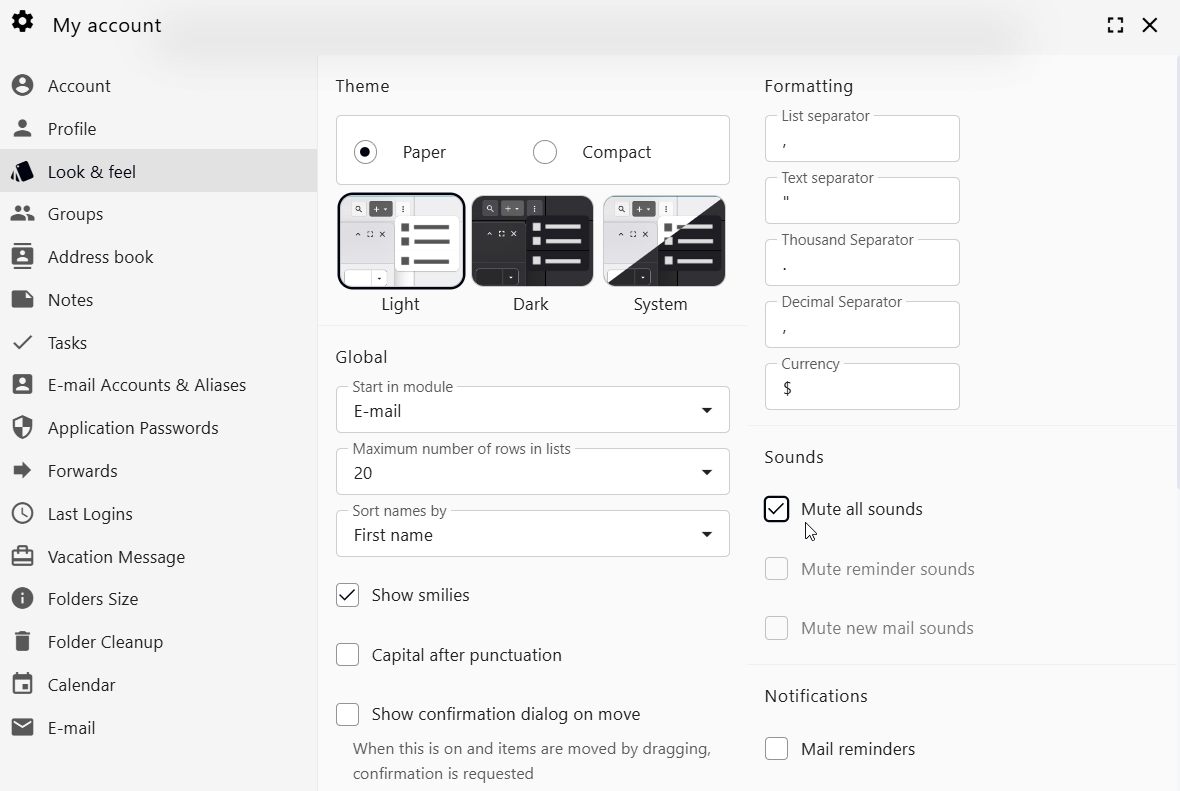
    Mute all sounds option in Webmail settings

  5. Done
    Your change will be saved automatically.


Tip

Do not want to mute everything? Leave Mute all sounds unchecked and use these individual options instead:

  • Mute reminder sounds
  • Mute new mail sounds
  • 0 Users Found This Useful
Was this answer helpful?

Related Articles

Using Email Templates in Thexyz Webmail

If you regularly send similar emails, Thexyz Webmail allows you to create and reuse email...

How to create email delivery rules in Webmail

Incoming Rules let Thexyz Webmail sort your mail as it arrives: filing newsletters into a folder,...

How to create an email alias

Email aliases are excellent tools for organizing your inbox, filtering spam, and protecting your...

How to use Undo Send in Thexyz Webmail

Everyone has sent an email a second too early. Thexyz Webmail gives you a short window after you...

How to create an Email Signature

Create an Email Signature in Webmail Adding a professional email signature helps build trust and...