
Thexyz Email allows you to fully customize the look and feel of Webmail to match your brand. Using the Client Area, you can personalize the Webmail interface with your company name, colors, and logo, creating a more professional and consistent experience for your users.
Branding can be applied globally to your account or overridden per domain if you manage multiple clients or brands.
What You Can Customize
Using Webmail branding, you can update:
-
Company name (shown in the browser title)
-
Website link
-
Support email address
-
Primary brand color
-
Company logo
Update Webmail Branding for Your Account
Step 1: Log in to the Admin Panel
-
Log in to the Thexyz Client Area
-
Open the service: Custom Domain EMail
Step 2: Open Branding Settings
-
In the menu bar, click Branding
-
The branding configuration screen will appear
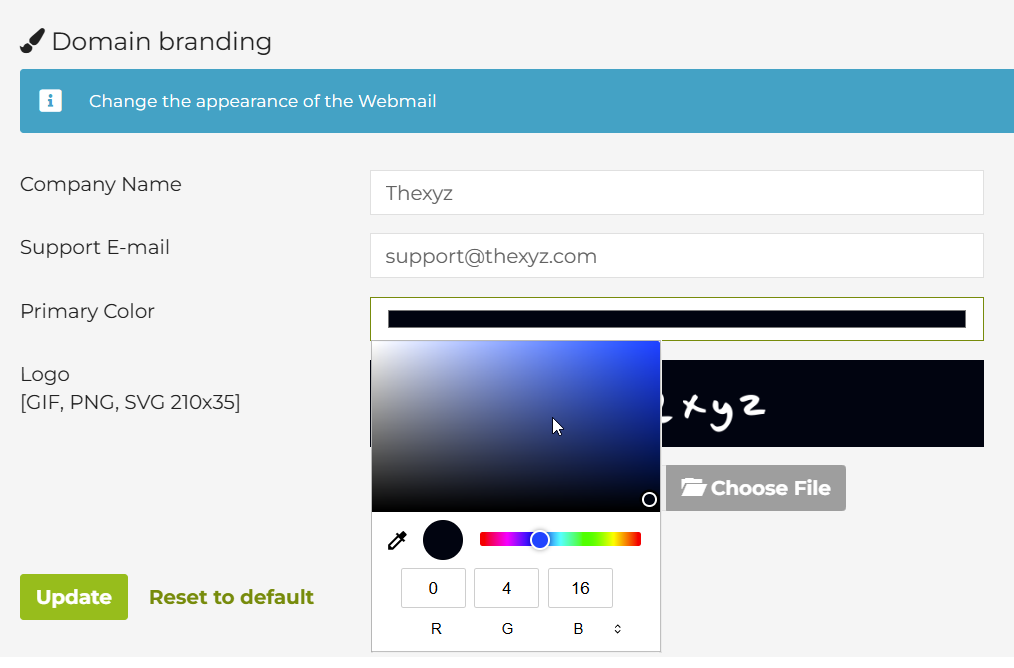
Step 3: Update Your Branding Details
Complete or update the following fields:
Company Name
-
Enter your company or organization name
-
This will appear as the Webmail page title in the browser
Company Web Link
-
Enter your website URL
-
This link is typically accessible from the Webmail interface
Support Email
-
Enter the email address used as the sender for spam reports
-
This is also where users may reply when reporting unwanted messages
Company Color
-
Select your primary brand color
-
This color is used throughout the Webmail interface for accents and highlights
Upload Your Logo
-
Click Upload to select a logo image from your computer
Logo size note:
While there is no strict upload size limit, logos are displayed within a 210px × 35px area in Webmail.
For best results:
-
Use a horizontal logo
-
Avoid excessive padding
-
Ensure good contrast on light and dark backgrounds
Step 4: Save Your Changes
-
Click Update Settings to apply your branding
-
Changes take effect immediately in Webmail
