Automatically forward email to another email account

You can use the email forwarding feature to send incoming email to an external email account by logging into Webmail: https://webmail.thexyz.com

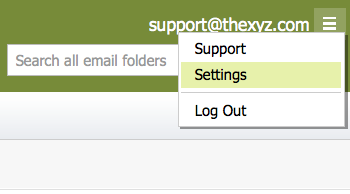
Then at the top right of the page, click the hamburger icon to access Webmail settings

webmail settings

Select Incoming Email and then select Forwarding
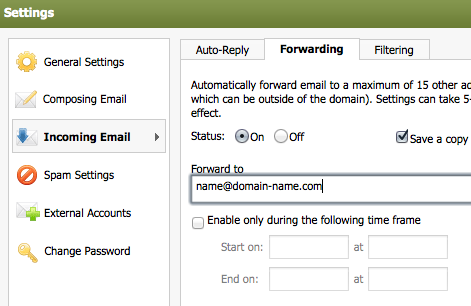
email forwarding


Status - Turn forwarding on or off.
Save a copy of forwarded email - Check to receive a copy of all forwarded emails.
Forward to - Enter the email address for forwarded mail.

Enable only during the following time frame - Check to have forwarding only function during a specific time period.

  • 187 istifadəçi bunu faydalı hesab edir
Bu cavab sizə kömək etdi?

Uyğun məqalələr

I am unable to log in to Webmail

If you are still unable to access Webmail, try the following troubleshooting steps: Verify the...

Webmail keyboard shortcuts

When you login to Webmail, your premium webmail account includes various keyboard shortcuts....

Moving an Email into a Folder

To move an email into another folder, click and drag the email from the email list to a folder in...

How can I access Webmail settings?

You can access Webmail settings of your Premium Email account by logging into Webmail:...

Renaming a Folder

To rename a folder with Webmail, follow the directions below:1. Right-click on the email folder...