Flagging an Email

Within Webmail you can use colored flags to mark an email that needs your attention. This also helps organize certain emails and makes them easier to find later.
    

  • To flag an email, click once on the flag icon.
  • To flag several emails, click the checkbox next to each email you want to flag, and then select Add Flag from the Select Action drop-down menu.
  • To change the flag color, right-click the flag icon and select a color.
  • To remove the flag, click the flag icon again.


The email flag menu can also be found under the More menu.
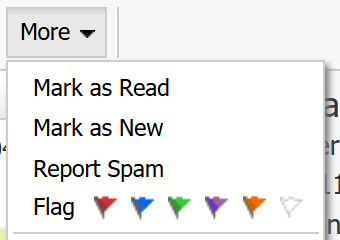

Flagging an Email

  • 126 Пользователи нашли это полезным
Помог ли вам данный ответ?

Связанные статьи

I am unable to log in to Webmail

If you are still unable to access Webmail, try the following troubleshooting steps: Verify the...

Webmail keyboard shortcuts

When you login to Webmail, your premium webmail account includes various keyboard shortcuts....

Moving an Email into a Folder

To move an email into another folder, click and drag the email from the email list to a folder in...

How can I access Webmail settings?

You can access Webmail settings of your Premium Email account by logging into Webmail:...

Renaming a Folder

To rename a folder with Webmail, follow the directions below:1. Right-click on the email folder...