Ever tried logging into your email, mistyped your password a few too many times, and suddenly the entire website refuses to load?
You aren’t alone. To keep your accounts safe from hackers and automated attacks, security systems temporarily block IP addresses that show suspicious activity—like repeated failed login attempts. While this keeps the bad guys out, it can accidentally lock you out, too.
To make getting back into your account as painless as possible, we’ve launched a brand new IP Blocklist Checker at bl.thexyz.co.
Here is a quick guide on how to use it to scan your connection and instantly remove accidental blocks.
How to Scan Your IP Address
We designed the checker to be as simple as possible. You don’t need to know any complicated network details to use it.
-
Visit the Checker: Go to bl.thexyz.com.
-
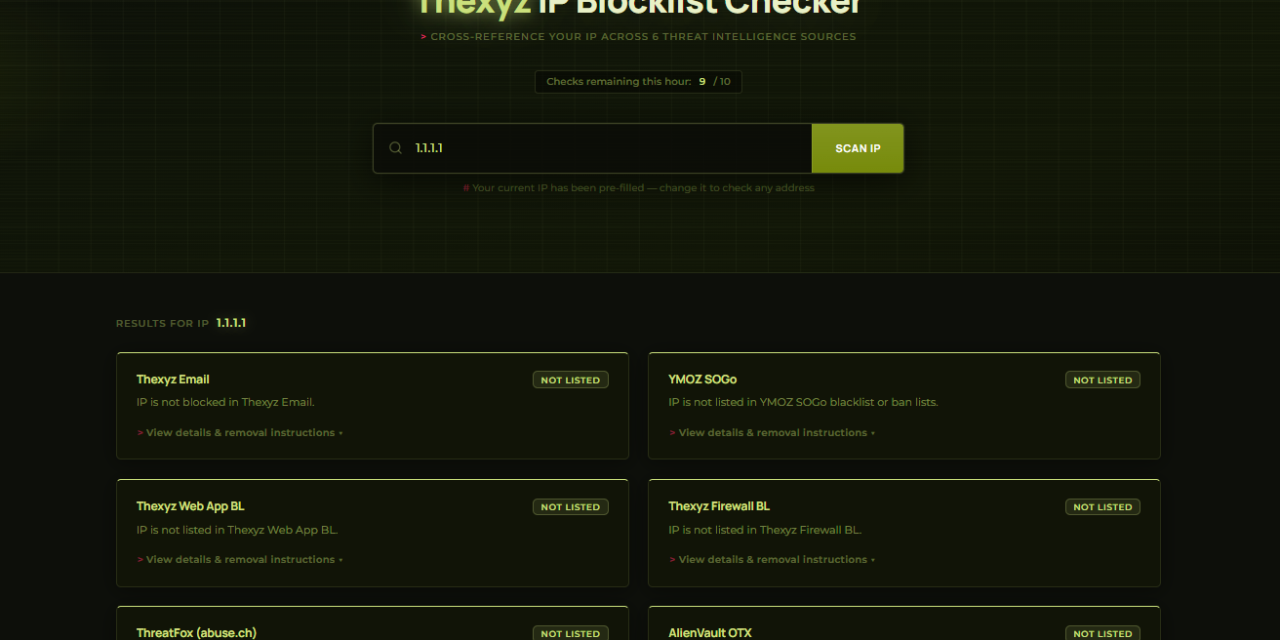
Check the Search Box: The tool will automatically detect your current IP address and fill it into the search box for you. (If you are checking on behalf of a friend or a different office location, you can delete it and type theirs in).
-
Run the Scan: Click the Scan IP button.
Note: To prevent abuse, the tool allows you to perform up to 10 checks per hour.
Understanding Your Results
Once the scan finishes, the tool cross-references your IP address against six different threat intelligence and firewall databases. It will generate a simple card for each system showing whether your IP is Not Listed (Safe) or Blacklisted (Blocked).
If you are blocked, click “View details & removal instructions ▾” on the card to see exactly how to fix it.
Here is what the different systems mean:
1. Thexyz Email & YMOZ SOGo (Instant Unblock)
If you are locked out of your webmail because of too many failed password attempts, you will likely see a block here.
-
The Fix: Good news! You can fix this immediately. The checker will provide a direct link to our Instant Removal tools. Just click the button, follow the prompt, and your access will be restored right away.
2. Thexyz Web App & Firewall (Support Ticket Required)
These blocks happen if our wider application firewall detects unusual traffic patterns or activity that resembles an attack.
-
The Fix: The tool will provide a button to open a support ticket. It will even draft the ticket for you, including your blocked IP address, so our administrators can quickly review and remove the block for you.
3. ThreatFox & AlienVault OTX (Global Threat Lists)
These are crowdsourced, global security databases that track severe malware and botnets.
-
The Fix: If your IP appears here, it usually means a device on your network might be infected with malware. You will need to clean your network and request removal directly through the abuse.ch or AlienVault portals.
For the Developers: API Coming Soon
Right now, the IP Blocklist Checker is a manual, easy-to-use web interface. However, we know that many of our power users and administrators would love to automate this process.
We are currently wrapping up development on a dedicated API for the IP Checker. Soon, you will be able to programmatically query our endpoints to check IP statuses and integrate threat intelligence directly into your own workflows. Keep an eye on the blog for the official API documentation release!